10 Useful Linux Programs Worth Installing
"Best Linux apps" lists usually contain the same names: VLC, GIMP, OBS. Anyone who has lasted more than a week on Linux already knows them. I'm more interested in tools you discover by accident in the comments and then can't imagine working without.
Below are ten such Linux programs that I actually installed. For each one: what problem it solves, how to install it, and where the catch is. The commands are tested on Arch, but almost everything is available on other distributions too.
In short: what to install and why
| Program | Task | Where to get it on Arch |
|---|---|---|
| Authenticator | one-time 2FA codes on your computer | extra |
| duf | a clear disk overview instead of df |
extra |
| jq | readable JSON in the terminal | extra |
| Popsicle | writing an image to several USB drives at once | AUR |
| Calamares | a graphical installer for your own build | AUR |
| fd | fast file search | extra |
| KOReader | an e-reader app with statistics and sync | AUR |
| Mousai | music recognition | extra |
| lazyssh | a terminal SSH server manager | AUR |
| linutil | a set of ready-made setup scripts | AUR |
Authenticator: 2FA codes without your phone
I used to keep all my two-factor authentication codes only in a phone app. It's reliable but slow: to confirm a GitHub or Steam login at the computer, you have to find the phone, unlock it and retype six digits.
Authenticator for GNOME generates the same TOTP codes right on your computer. You add an account manually with the secret key or by scanning a QR code — from the camera, a screenshot or an image file.
sudo pacman -S authenticator
Secrets are stored in the GNOME keyring, so window managers like BSPWM need gnome-keyring and a working Secret Service.
An important security point: a second factor on the same computer where you type your password is no longer quite a second factor. I keep codes on my PC for services where convenience matters more, and leave email and banking on a separate device.
duf: your disks in one table
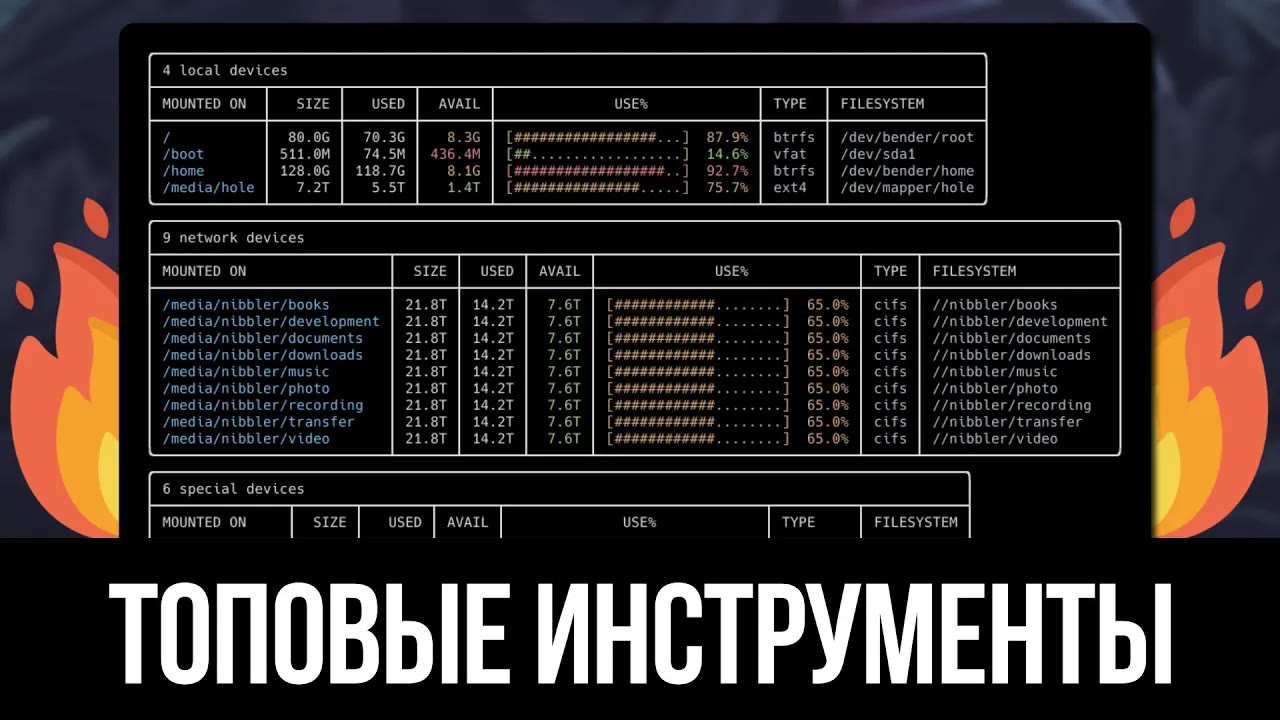
df -h prints plain text where it's easy to get lost among tmpfs and loop devices. duf shows the same information as tables: local disks, network and special filesystems separately, with size, used and free space, usage percentage, filesystem type and mount point.
sudo pacman -S duf
duf
The most useful parts are filters and sorting:
duf --only local              # local disks only
duf --only local,network      # local and network
duf --hide-fs tmpfs,vfat      # hide service filesystems
duf --sort size               # sort by size
duf --output mountpoint,size,usage   # keep only the columns you need
duf --all                     # include pseudo filesystems
duf runs on Linux, BSD, macOS and Windows and is perfect for a quick "where did my space go" check. To find which folder ate the disk, ncdu is more convenient, and disk load is better watched with the tools from the Linux monitoring guide.
jq: JSON you can actually read
duf has a --json flag, which is a good reason to bring up jq. An API response or a one-line utility output turns into a formatted, highlighted document:
duf --json | jq
curl -s https://api.github.com/repos/muesli/duf | jq '.stargazers_count'
But jq is not just a formatter. It's a query language: you can pick fields, filter arrays and build new objects.
# mount points that are more than 80% full
duf --json | jq -r '.[] | select(.total > 0 and (.used / .total) > 0.8) | .mount_point'
With it, the habit of pasting JSON into online formatters disappears — along with the risk of sending something confidential there.
Popsicle: one image, many USB drives
When you need several bootable drives — for a workshop, or spare media with different systems — writing them one by one takes a long time. Popsicle, from the Pop!_OS developers, writes an image to several USB devices in parallel: pick the ISO, tick the drives, start.
paru -S popsicle-bin
You can also build it from source with make && sudo make install. When ticking devices, double-check the list: writing wipes the whole drive, and an external disk with data can easily end up in the same list.
Calamares: an installer for your own build
This one is for people who, like me, build their own desktop setup or distribution. Calamares is a modular graphical installer used by many distributions: language, time zone, keyboard layout, disk partitioning, user creation.
It isn't an "install and use" app but a framework configured through its modules. Start with the official user guide and developer documentation on Codeberg, where the main repository now lives. A beginner doesn't need it, but for someone distributing their own build it saves months of installer work.
fd: file search without a wall of flags
find can do everything, but its syntax is overkill for everyday search. fd searches by pattern, skips hidden files and .gitignore paths by default, highlights results and runs in parallel.
On my Obsidian notes vault I compared the two: find spent roughly ten to twenty seconds per query, while fd finished in under a second. That's my specific measurement, not a universal guarantee. Installation, filters, the fzf combo and the cases where find is better are covered in the separate article fd vs find.
KOReader: a reader that doesn't lose your notes
I looked at KOReader after an unpleasant Kindle Paperwhite story. I read a book, made about a hundred highlights, and when exporting found only a handful of them. Kindle limits how many notes you can export from a book and doesn't warn you in advance. After that, many people install KOReader on their e-readers.
What does Linux have to do with it? KOReader runs not only on Kindle, Kobo and PocketBook but also on Android and on a regular Linux computer. You can read on your PC in the same app you use on the e-reader:
- flexible EPUB layout: fonts, margins, line spacing, contrast;
- margin cropping and zoom for PDF;
- reading statistics per book and per day, a calendar and a timeline;
- a dictionary, Wikipedia and translation of selected text;
- Calibre integration: wireless book transfer and note export;
- cloud storage and RSS.
paru -S koreader-bin
PDF is less configurable than EPUB because the format locks the layout. If the book is available in EPUB, take that.
Mousai: recognize a song on your computer
For music recognition on Linux I used SongRec, but its interface looks dated. Mousai does the same in a modern GTK interface: it listens to the microphone or system audio, finds the track and saves it to your history.
sudo pacman -S mousai
The catch worth knowing: recognition goes through the third-party AudD service. There are only a few free attempts; after that you need to register and enter a token. The audio fragment is sent to an external server.
lazyssh: SSH servers the lazygit way
If you like lazygit and lazydocker, lazyssh is the logical next step. It's a terminal interface for the servers in ~/.ssh/config: a searchable host list, one-key connection, adding and editing entries, copying keys to a server and transferring files.
paru -S lazyssh-bin
You can also download a ready binary from the GitHub releases. It's nice that lazyssh doesn't introduce its own format: it works with the same ~/.ssh/config that plain ssh uses and breaks nothing if you drop it one day.
linutil: ready-made setup scripts
linutil is a set of scripts in a terminal menu: installing applications, configuring the system, gaming components and handy tweaks for different distributions. I don't use it as a magic button but as a reference: I look at how a task is solved and take the commands I need into my aliases, hotkeys and desktop build.
The official way to launch it is curl -fsSL https://christitus.com/linux | sh. I don't do that: a script from the internet runs immediately with your permissions. It's safer to install the AUR package or read what will actually be executed first.
paru -S linutil-bin
Who doesn't need this list
- If you've just switched to Linux, start with the basics. Calamares, linutil and lazyssh are useful for people who already understand what they're doing. I wrote about the first steps in the story of why I moved from Windows to Linux.
- If strict security matters more than convenience, keep 2FA on a separate device and don't use Mousai for confidential recordings.
- If you're not on Arch, package names may differ, and some programs are easier to install via Flatpak.
My approach is simple: a tool stays only if it saves time every week. From this list, duf, jq, fd and Authenticator have stuck with me for good; the rest I enable for specific tasks. For more proven software, see the review of 20 open source programs that replaced paid ones for me.