Unusual Linux Utilities: Portmaster, EWW, Tabiew and More
One of the most common questions under my Obsidian videos went like this: "What if, in the next update, the app starts sending your notes to a server?" The risk really exists for any program that downloads updates and plugins on its own. My answer isn't trust in the developer but control: an app without internet access simply can't send anything.
That's where this list of unusual Linux utilities starts — tools that give you more control over the system, speed up working with files and data, and make your environment more convenient. Almost all of them also work on macOS, and some on Windows.
Portmaster: a firewall for every application
Portmaster is an open-source network firewall with a GUI that runs on Linux and Windows. On the left is the list of applications that went online, on the right their connections: where, when, allowed or blocked. You can set rules per program or cut its internet access entirely with one button.
How this answers my Obsidian question. Obsidian is built on Electron, and Portmaster shows it as a separate application. I click "Block Connection" — and Obsidian loses network access. The check: I open the plugin catalog and try to install a plugin — nothing loads. That means an unexpected update won't arrive either. Remove the block — everything works again.
Who else I'd cut off from the internet:
- a password manager like KeePassXC — it doesn't need the network to work with a local database;
- an office suite: if you open a document with a malicious macro, it won't be able to download the payload or send data out;
- personal finance apps and other local applications;
- LM Studio and similar tools after the model is downloaded, if you want a guarantee that prompts go nowhere.
Portmaster can also block individual domains and enable secure DNS for the whole system. I don't use that option: my DNS is configured on a router running OpenWrt, and a local setting would intercept requests earlier. If you enable your own DNS, check afterwards on a site like dnsleaktest.com which server actually answers.
BlobDrop and mat2: drag and drop from the terminal
BlobDrop opens a small window with a file you can drag with the mouse into a browser, a messenger or any other application:
blobdrop screenshot.png
On its own it's like grep: it doesn't do much alone, but it fits perfectly into command chains. My example is sending pictures without metadata. First mat2 strips the metadata (camera, location, software), then BlobDrop hands over the clean file for dragging:
mat2 photo.jpg && blobdrop photo.cleaned.jpg
I bound this to a custom action in the Thunar file manager: right-click an image → "Clean and drag". You can do the same with an alias or a hotkey.
EWW: panels and widgets of any complexity
EWW (ElKowar's Wacky Widgets) is a widget system written in Rust. It isn't a ready-made bar like Waybar or Polybar but a construction kit: you describe panels, pop-up menus, calendars, players and sliders in your own config, and pull data from any Bash or Python scripts.
Community screenshots show vertical panels with folders, battery and Wi-Fi, menus with the number of emails and uptime, players with a spectrum visualizer. The learning curve is steeper than Waybar's, but so are the possibilities. If you don't want to build from scratch, start from someone else's ready-made config and gradually adapt it. I'm still on Polybar myself, but EWW is the next candidate.
SpeedRead: fast reading of easy text
SpeedRead shows text one word at a time at a fixed point on the screen — your eyes don't have to travel along the lines:
cat note.md | ./speedread -w 250
The default speed is 250 words per minute; while reading you change it with the [ and ] keys, and space pauses. Even at very high speeds light text stays readable, but comprehension drops — a well-known limitation of this method. So I use it for simple things: reviewing my own notes, skimming a light book. Technical literature shouldn't be read this way.
Tartarus Startpage: your own browser start page
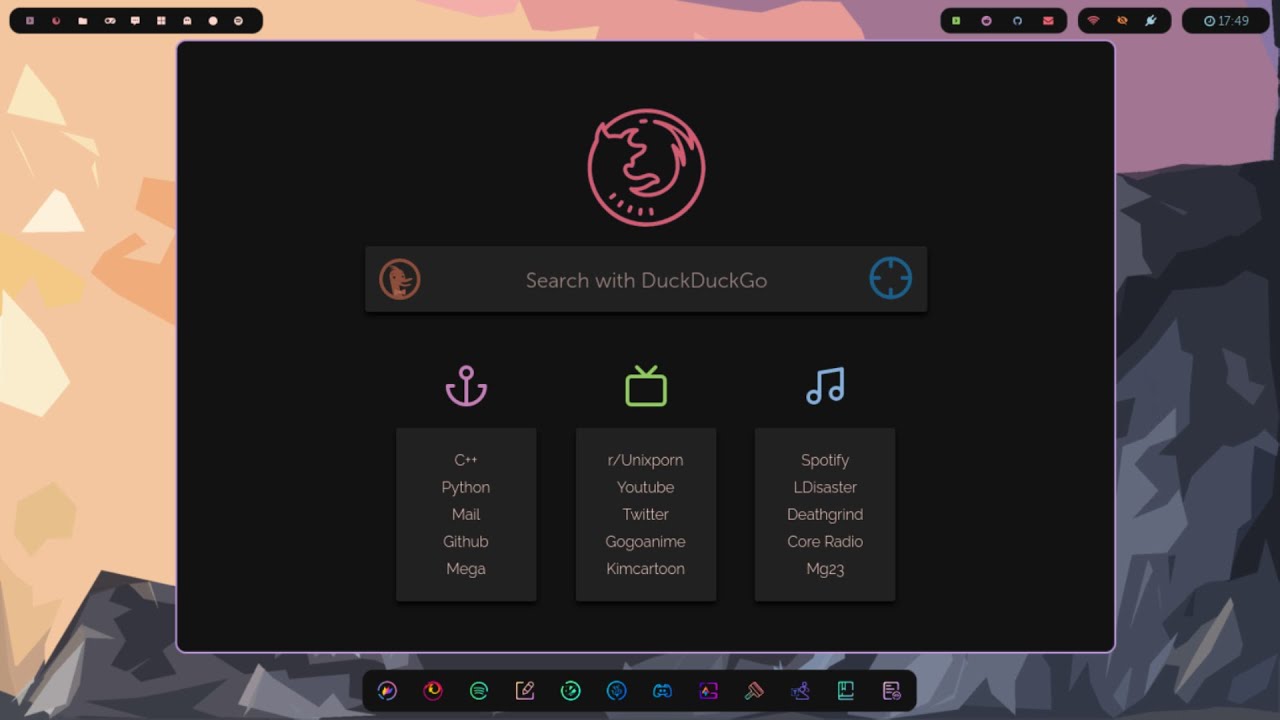
Tartarus Startpage replaces the Firefox or Chromium home page with your own dashboard: links with icons and colors, a hotkey for every site, search, several "desktops" with different sets of links, time and weather. Everything is described in a config, so the same page is easy to move to any system.
downloader-cli: neat downloads from the terminal
downloader-cli is a simple downloader with a clear progress bar. It installs from PyPI or the AUR, and the command is dw:
pip install downloader-cli
dw https://example.com/archive.tar.gz ~/Downloads/
You can also use it from code:
from downloader_cli.download import Download

Download("https://example.com/archive.tar.gz").download()
The project is just a few files, which makes it a good learning base: for example, rewrite it in Rust and package it for different distributions.
Hellwal: a terminal palette that matches your wallpaper
Many people use pywal: it takes the dominant colors of the wallpaper and applies them to the terminal and other programs. But the pywal repository has long been archived. A fast alternative written in C is Hellwal:
hellwal -i ~/images/wallpaper.png
hellwal -i ~/images --random     # a random wallpaper from a folder
The palette is written to ~/.cache/hellwal/ using templates, and the --script flag lets you run your own command after generation — for example, reload the bar. I added a Hellwal call to my wallpaper-switching script on Win+W.
GGH and Tabiew: SSH and tables in the terminal
GGH is a lightweight wrapper around SSH. The ggh command shows an interactive list of previous connections, and ggh - lists the hosts from ~/.ssh/config with search. It doesn't replace SSH; you just stop having to remember addresses and ports.
Tabiew opens tabular data right in the terminal: CSV, TSV, JSON, Parquet, Excel, SQLite and other formats. It has Vim-style navigation and SQL queries against the opened file:
sudo pacman -S tabiew
tw data.csv
For a quick look at an export or nested JSON it's more convenient than opening an office suite.
Just for looks: tty-clock and terminal-rain
Two utilities people often hunt for after seeing Reddit screenshots: tty-clock draws a big clock in the terminal (tty-clock -c centers it), and terminal-rain-lightning shows a rain animation with lightning. Zero productivity value, but perfect for screenshots of your setup.
What to install first
| Task | Tool |
|---|---|
| Block an app from the internet | Portmaster |
| Drag files from the terminal | BlobDrop + mat2 |
| Your own bar and widgets | EWW |
| A palette that matches the wallpaper | Hellwal |
| Quick access to servers | GGH |
| Viewing CSV and JSON | Tabiew |
If you keep notes in Obsidian, start with Portmaster: I described how my note system works in the article Obsidian after three years. For the rest of your environment, see 10 useful Linux programs and the breakdown of Linux monitoring.